Mini GPS Autonomous Car for Under $100
Posted: July 20, 2009 Filed under: Projects 67 CommentsFirst off, if you haven’t watched episode #5 of The Tech Junkies, I’d have to insist you do that now:
Okay, so let’s get onto the details. As seen in the video, we hacked apart a $15 Radioshack R/C car for the purpose of outfitting it with a GPS chip. We ripped out the motor that was being used for steering and replaced it with a low-cost $10 servo. We also cut out the existing electronics so that only the wires coming from the battery and running to the drive motor we’re left. From here we took a breadboard and connected up our H-Bridge drive chip.
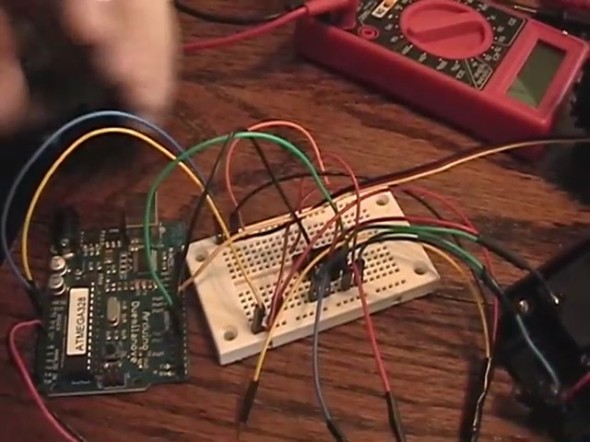
GPS Car H-Bridge
The H-Bridge chip is given the job of providing current to the motor (whether it be forward or reverse) which takes its inputs from a microcontroller. As you can see, for this project we ended up using a standard Arduino board. Here’s a color coded schematic of the whole project:
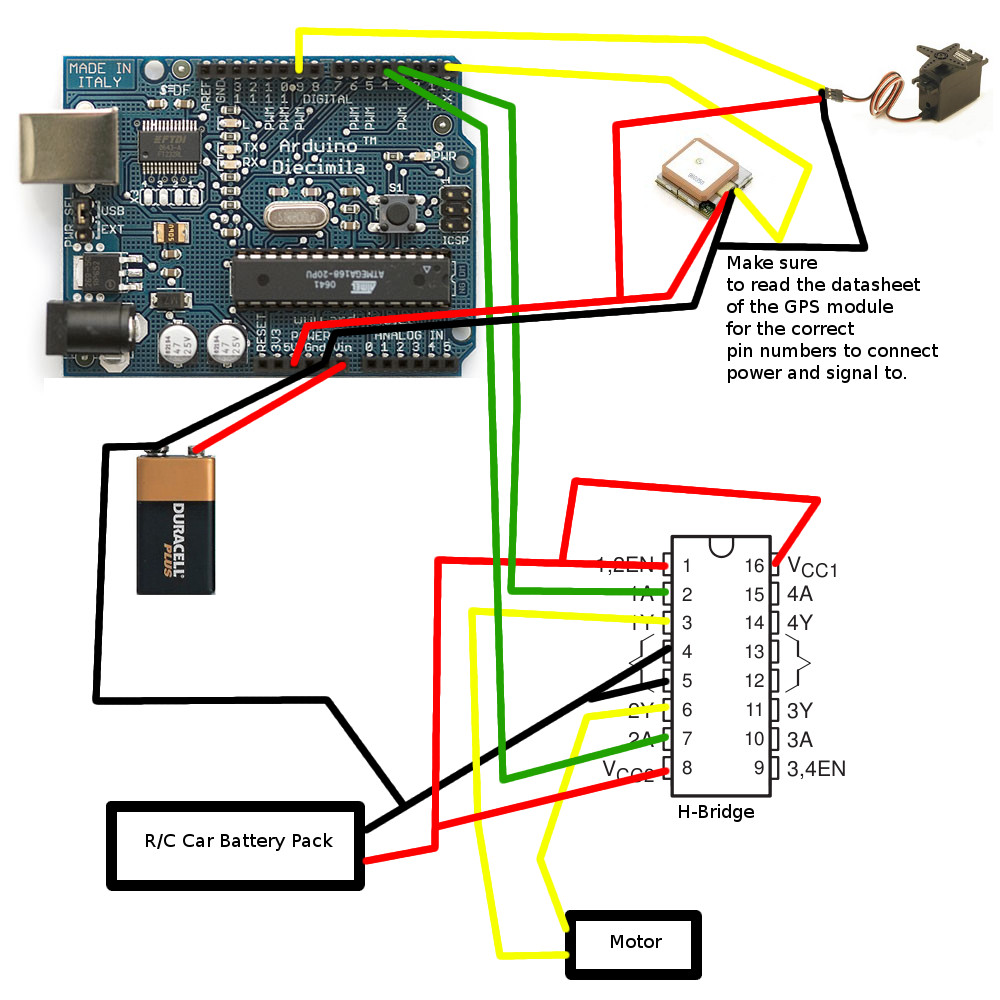
GPS Car Schematic
Once everything is all connected up, all that’s left is to re-assemble the car and write some code to it. The first thing you’re going to need, are the coordinates you want your car to drive. If you haven’t watched the video yet, now would be a great time! The piece of Javascript you’re going to need while using Google maps is as follows:
javascript:void(prompt(“”, gApplication.getMap().getCenter()));
Paste that into your address bar, hit enter, and then you should get a message box with the coordinates in degree decimal format. This is what our program running on the car will use.
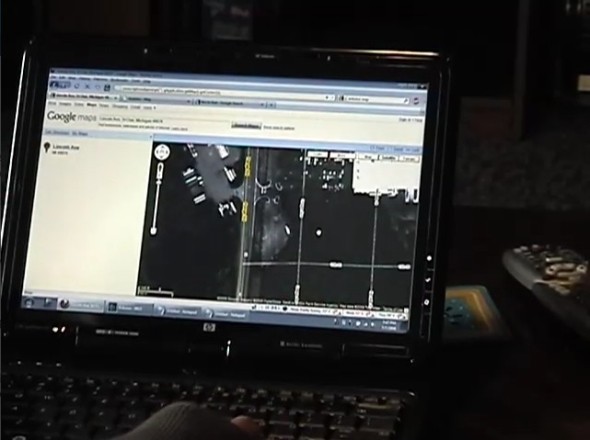
Google Maps
Speaking of the program running on the car, you can grab our full source code right here: GPS Car – Arduino Sketch. You’re also going to need the Arduino NMEA library for this to compile, which you can grab from here.
Edit: Since the release of Arduino 1.0, the NMEA library is broken. You can fix this by opening up nmea.cpp and changing #include “WProgram.h” to #include “Arduino.h” Then open up nmea.h and change #include “WConstants.h” to #include “Arduino.h”
The code should be documented for the most part. The only code you should need to change will be right under the line “/* BEGIN EDITABLE CONSTANTS SECTION */”. Everything is pretty much self explanatory…just make sure you have all your connections in the same place as we did.
NOTE: You cannot write the program to the Arduino with the GPS pin connected to the RX pin. If the GPS chip is outputting data, it will interfere with the uploading of the program. Just make sure to reconnect the pin after your program is flashed to the chip!
Well, there you go! Now you should have everything to get you started with building your very own sub $100 GPS navigated vehicle. Enjoy and make sure to contact us or leave a comment if you make something cool based off these concepts.
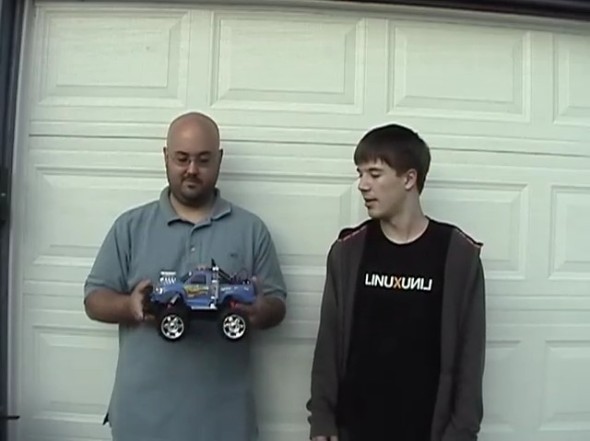
GPS Car
 The Tech Junkies
[…] This post was Twitted by rsisk101 […]
Hey guys. Nice work. What sort of H-Bridge IC did you use? Thanks.
We used these off of SparkFun Electronics:
http://www.sparkfun.com/commerce/product_info.php?products_id=315
Eric
Hi Eric..
i very interested with your project and i change some of part but i dunno how to edit in program.
FYI: i use 3 motor, 2 (front) for control right n left and 3rd(back) motor only to forward.
i try use your program driveToTarget below and edit a little bit, but because i not use servo i dunno how to change program in double star below.
Can u help me Eric..?
void driveToTarget() {
**servo_pos = map(dir, -75, 75, MAX_LEFT_SERVO, MAX_RIGHT_SERVO);
steering.write(motor_pos);**
Motor3(200,true);
Serial.print(“Driving at “);
Serial.print(dir);
Serial.print(“. – “);
Serial.print(gps.gprmc_distance_to(dest_latitude,dest_longitude,MTR));
Serial.print(“m to go”);
Serial.print(“n”);
}
Hi Edward,
How do you have your motors connected? Are you feeding everything through the H-Bridge? In that case, you won’t be able to control the speed of the motors…just drive them forwards or reverse.
i’m not using h bridge…i change to DFRduino 1A motor driver…that same function as H-Bridge…and yes i just control forward n reverse but have change steering from using servo motor to 2 dc motor (left and right) that if i want steer to right(right motor fwd left motr rev) and vice versa.
FYI:
Motor driver
http://www.dfrobot.com/wiki/index.php?title=Arduino_Motor_Shield_%28L293%29_%28SKU:_DRI0001%29
Platform+motor
http://letsmakerobots.com/node/8250
sry to bother u eric but i’m new in programming and i really need help, any suggestion / comment i really appreciate…TQ
Hmm, well it’s going to be a little bit simpler then because you can’t control how much you’re turning. I would start out by ripping all of the Servo stuff out since you won’t need it.
You should be able to set a threshold for when you should drive straight and when you need to turn either left or right. For example:
if (dir > -5 && dir = 5)
// Turn one direction
else
// Turn the other direction
By doing this, your robot will drive straight if it’s within 5 degrees of where it wants to drive to, otherwise it will try to turn as it’s driving to head towards its target angle. Keep in mind that the robot needs to keep moving so that the GPS can keep calculating your heading. This could be a bit tricky if the robot is on the slow side. Take a look at that Motor driver page you sent me and check out the example code for controlling the speed of each motor.
thanks eric..i’ll will try it…
I’ve got some problem regarding this project, can you help me how solve the problem, here some attachment from my project.
Source Code:
http://www.megaupload.com/?d=LT2E0VZS
Motor Wiring Diagram
GPS Wiring Diagram
Thom, what exactly are you having an issue with?
First I didn’t use the $GPRMC code to receive the GPS data. I’ve tested my GPS Module (FV-M8) using this code
// necessary libraries
#include
#include
#include
// initialize the LiquidCrystal library with the numbers of the interface pins
LiquidCrystal lcd(8, 9, 10, 11, 12, 13);
// The GPS module’s TX pin will connect to the Pin 1
// Arduino’s RXPIN which is pin 0.
#define RXPIN 0 //GPS TX pin connects to Arduino
#define TXPIN 1 //GPS RX pin connects to Arduino
#define GPSBAUD 4800 //Baud rate of our EB-85A GPS module. C
// Create an instance of the TinyGPS object
TinyGPS gps;
// Initialize the NewSoftSerial library to the pins defined above
NewSoftSerial uart_gps(RXPIN, TXPIN);
// Declare prototypes for the functions that will be using the TinyGPS library.
void getgps(TinyGPS &gps);
// Standard hardware serial port (Serial()) to communicate with the
// terminal program an another serial port (NewSoftSerial()) for the GPS.
void setup()
{
uart_gps.begin(GPSBAUD); // setup sketch for data output speed of GPS module
lcd.begin(16, 2); // set up the LCD’s number of rows and columns
lcd.clear();
lcd.setCursor(7,0);
lcd.print(“GPS”);
lcd.setCursor(6,1);
lcd.print(“ROBOT”);
delay(3000);
lcd.clear();
lcd.setCursor(6,0);
lcd.print(“TARGET”);
lcd.setCursor(5,1);
lcd.print(“LOCATION”);
delay(3000);
lcd.clear();
lcd.setCursor(4,0);
lcd.print(“LOADING”);
delay(500);
lcd.setCursor(11,0);
lcd.print(“.”);
delay(500);
lcd.setCursor(12,0);
lcd.print(“.”);
delay(500);
lcd.setCursor(13,0);
lcd.print(“.”);
}
// This is the main loop of the code. All it does is check for data on
// the RX pin of the ardiuno, makes sure the data is valid NMEA sentences,
// then jumps to the getgps() function.
void loop()
{
while(uart_gps.available()) // While there is data on the RX pin…
{
int c = uart_gps.read(); // load the data into a variable…
if(gps.encode(c)) // if there is a new valid sentence…
{
getgps(gps); // then grab the data, and display on LCD
}
}
}
// The getgps function will get and print the values we want.
void getgps(TinyGPS &gps)
{
float latitude, longitude; // Define the variables that will be used
gps.f_get_position(&latitude, &longitude); // Then call this function
lcd.clear(); // clear LCD
lcd.setCursor(0,0);
lcd.print(“Lat N: “);
lcd.print(latitude,5);
lcd.setCursor(0,1);
lcd.print(“Long E: “);
lcd.print(longitude,5);
}
and recently my colleague Edward already ask about how to control the the robot movement (Left and Right) using the DC motor, and he already done the programming part for control the robot direction.
How I want to combine your program with my GPS code? Thanks a lot Eric.
i’ve tried the same code it works well but i need to do some changes. i need to fix a serial camera which takes a series of pics from the start to the finish..in the same code. can anyone help with the coding using the camera LS_Y201.
Hi guys!
Interesting project you have there! Anyways, I just wanna ask how can you read the gps coordinates of the car using C++?
Hey mykz1608,
We’re actually using an Arduino Library that will read serial commands from the little GPS module we show off in the video. It costs around $60 and you can get it from sparkfun.com. It makes getting GPS coordinates a breeze!
Hey Eric:
do you have a part number for the Arduino Library u are using. I’m trying to replicate your project.
Hey Miguel,
This is probably what you’re looking for: http://www.maartenlamers.com/nmea/
Eric
thanks for your time.
Great post. I am having trouble with my servo and was wondering if you had any insight. When sending a PWM to my servo through the netduino, it just shakes and its position remains the same (except the shaking). I am using a very similar servo (HS-81). I have tried several different values for the pulse period and am using the same mapping function as you are. I am using a min value of 600 and a max value of 2400 for the mapping function and am translating those values into degrees and am using 0 degrees to 180 degrees. Any help at all would be very appreciated!
Thanks again!
Hey PJE,
Are you using a Netduino or an Arduino? What sort of refresh frequency are you running at or is it just a Servo library you’re using?
Eric
I would like to try this project. I have zero electronic or programming experience that said I know rc cars like the back of my hand. Can this project be done using a hobby grade rc car and be able to use a electronic speed control instead of a H bridge? I have both brushed and brushless but would probably use a brushed setup. Any info would be great. Thanks
Hey Jamee,
This project will actually be a lot easier for you since you’ll be using speed controllers! The easiest way to get started with using speed controllers and Arduino is just creating another Servo object like I did at the top of the program. Both servos and speed controllers use the same control signal – PWM or pulse width modulation.
You then set that Servo object to any value between 0 and 180. With an R/C car, 180 would be full speed forward, 90 would be stopped, and 0 would be full speed reverse. You’ll need to tweak the code to modify this value to set your speed rather than using the digital outputs that we were using for the H-Bridge. I’m assuming the hobby grade RC cars you have use a servo for steering?
This is just a general overview of what you’ll need to do, but as you start digging in and working through the project we can help you out along the way. Good luck!
Eric
So how can I download the sketch as the link gives me a 404 error on another page of your website? Sorry but I am a major green horn!
Thanks for the help and the responses that you have given for everyone!!
Hey Jamee,
Thanks for the heads up! Just fixed the link…give it a shot now.
Eric
when I try to compile I get this error:
“nmea.cpp:325: error: ‘dec’ was not declared in this scope”
anyone have any ideas?
Hi Jay,
What version of the Arduino IDE are you using? I believe a few things changed in 1.0 so the library may not be compatible anymore. I was using arduino-022 at the time.
Eric
Dear i am using NMEA library for my autonomous Robot in this Process i am using GPS EM406a for GPS and displaying that data on the LCD but the data is varying Continuously why can you Help me relating to your video
Can you describe in detail what you mean by varying continuously?
Its not constant the direction is changing
Hmm, is the GPS sitting still or is it moving? GPS works by calculating differences between points, so if you’re sitting still you won’t be able to get a heading/direction.
Ok but how to get the heading if we are still can we change the library
Unfortunately this is a limitation of GPS. It sounds like what you need is a digital compass module.
Hi! First off, Thanks for the project. I had a day off work so I thought I would take a shot at this. It works to some degree. Not quite as well as your results.
My vehicle does lots of circles and random change of direction. I was wondering how hard it would be to implement multi stage turning maybe 25,50,75,100% of the Max threshold for Left/Right steering. Seems this would enhance the resolution and stability by a large amount.
I used a SiRF starIII GPS module, presumed to be a fairly sensitive one from research. I also eliminated the H-Bridge portion of the code and replaced it with another servo output for use with a R/C ESC unit. Works great. I only wish I had the programming skills to refine this a bit more.
I’ll take the suggestion and speed it up a bit, maybe that will help with the calculations. I was probably running the car at about 5mph. Its capable of 37mph I’m too much of a pansy to run it that fast without my direct control LOL.
Thanks again guys.
Hi TJ,
Glad to hear you were able to get something cool up and running. The multi-stage turning could definitely help solve the problem…if you get a chance to revisit it at all, let us know =)
It’s very possible that you’re just not moving quick enough or the sensitivity at which you’re varying the wheels is a bit too high. It definitely took some experimenting to get ours working properly. I’m sure you could see from the video that our initial attempts were all over the place!
I know what you mean by being out of control…just be glad it hasn’t gained self awareness yet!
Eric
I like the project and I am wondering if you can post the code so we can use it ? if it possible
thanks
Husain
Hi Husain,
Looks like we need to make the download link a bit clearer 🙂 Just click on the link that says “GPS Car – Arduino Sketch” and have at it!
Eric
Thanks , I saw the link but I am using a mac so when I download it says no applications. also I have question, if I want to make it work on the two mode . like manually and by the GPS, that’s will be possible ?
Thanks
I have problem , When I tried the code !! the libraries doesnt working !!! I dont know why
also when I use the example of the library is not !!
it is give me an error every time
gprmc_course.cpp:14:18: error: nmea.h: No such file or directory
gprmc_course:15: error: ‘NMEA’ does not name a type
gprmc_course.cpp: In function ‘void setup()’:
gprmc_course:23: error: ‘Serial1’ was not declared in this scope
gprmc_course.cpp: In function ‘void loop()’:
gprmc_course:29: error: ‘Serial1’ was not declared in this scope
gprmc_course:34: error: ‘gps’ was not declared in this scope
please can yo help me
Hello Eric. I’m making an autonomous rc vehicle w sensors for obstacle avoidance and a locosys gps ls23060(supposedly same as 20031) at 5Hz/3.3v/41mA. Hbridge handles drive/steer dc motors and has its separate 9v. I’m using an arduino uno which sends inputs to hbridge and powers the gps through the 3.3v power pin. Arduino powered by 9v also. I can test the gps by itself on serial monitor and it works fine but car doesn’t want to budge on the street. I gave it 1 coordinate, about 3 blocks away. I believe gps works at 57600bps and accurate to 5, I’m not too good at programming but I think its not moving because its not even getting to the drive command. It’s failing before that, possibly at the if statements or nmea functions. I’d really like it to do what you both have accomplished. I could show you my code if that would help. I’m stuck. Thanks.
Hey Alex,
I’d be happy to help. Go ahead and post the code so I can take a look =) Have you tested the drive functions on their own (i.e. ripping out all the GPS code and just calling the drive functions.) If your drive stuff appears to be working, see if the active flag is getting set in the NMEA data. That’s one of the checks before the car will start to move.
Eric
How do you check if the active flag is getting set in the NMEA data?
How did you get NMEA library to work with the Arduino board? Because, I am having trouble with it.
is there any way that i could add way points into arrays and i want to get my way points off an SD card
thanks
Hey Simon,
That should be possible. I would use a terminating character for each line and just step through the entirety of a text file. Take a look here for the reference for the SD library:
http://arduino.cc/en/Reference/SD
This could prove helpful as well:
http://www.arduino.cc/cgi-bin/yabb2/YaBB.pl?num=1290965180
Eric
Hello Eric, can you help us to connect compass module HMC6352 to your system and modify the code?
Hi Tomas,
You should just be able to get away with native Arduino code and work from an example like this:
http://arduino.cc/playground/Learning/Hmc6352
Let me know if you run into any road blocks along the way…I can’t say I’ve done a whole lot with compass integration though.
Eric
hello eric, why when i compile the coding using arduino 1.0.1, it says “NMEA” does not name a type. i hope you can help me….i’m new in arduino..tq.
Hi jo,
Arduino 1.0 essentially broke every Library that hadn’t been updated. All you should have to do is open up nmea.cpp and change #include “WProgram.h” to #include “Arduino.h”
Then open up nmea.h and change #include “WConstants.h” to #include “Arduino.h”
Eric
thanks…Eric..can i replace gps module 20 CHANNEL EM-406A SIRF III RECEIVER to arduino gps shield 1.0….what should i do?….i want to make this for my final project…
Hey jo,
You should be able to use the same exact GPS module (the EM-406) and take a look at the example sketches provided by ladyada.net:
http://www.ladyada.net/make/gpsshield/download.html
I’m assuming that’s the same shield you wish to use?
Eric
hi,,i want to know how to change #include “WProgram.h” to #include “Arduino.h and #include “WConstants.h” to #include “Arduino.h”….tq
Hi jo,
I just published an updated version of the Library here:
https://github.com/ericbarch/arduino-gps-car/raw/master/nmea_patched.zip
Just had to edit the .h and .cpp files =)
Eric
hello i was just wondering , since the ardurino board that u r showing here is no longer in production , can we use other type of ardurino board for example ardurino uno ?
Yup, should work with any Arduino compatible with the Ethernet Library!
Hey I was actually trying to implement this project but the car I bought has a speed controller, since I am not using the H bridge what would I need to change from the schematic?
Thank you in advance.
Hi Joseph,
In that case you can just connect the signal line from the speed controller to another digital pin and create another Servo instance on that pin (very similar to how the steering Servo is setup). The Servo library allows you to send a value between 0-180 degrees. For a speed controller, 90 would typically be neutral, 0 full reverse, and 180 full forward.
Good luck!
I am not really an expert on programming but I gave it a try. Does the changes I made for the speed control look right?
Thanks again!
#include
#include
#undef abs
#undef round
int wpt = 0;
float dest_latitude;
float dest_longitude;
NMEA gps(GPRMC); // GPS data connection to GPRMC sentence type
/* BEGIN EDITABLE CONSTANTS SECTION */
//These define the positions for your steering servo
#define CENTER_SERVO 95
#define MAX_LEFT_SERVO 85
#define MAX_RIGHT_SERVO 108
//Speed Controller
#define STOP_SPEED 90
#define FORWARD_SPEED 120
#define REVERSE_SPEED 70
#define TURN_SPEED 100
//When the car is within this range (meters), move to the next waypoint
#define WPT_IN_RANGE_M 12
/* DEFINE GPS WPTS HERE – Create more cases as needed */
void trackWpts() {
switch(wpt) {
case 0:
dest_latitude = 32.298927;
dest_longitude = -90.212195;
break;
case 1:
dest_latitude = 32.298977;
dest_longitude = -90.213118;
break;
case 2:
dest_latitude = 32.299848;
dest_longitude = 90.213407;
default:
dest_latitude = 0;
dest_longitude = 0;
break;
}
if (gps.gprmc_distance_to(dest_latitude,dest_longitude,MTR) 0 ) {
char c = Serial.read();
if (gps.decode(c)) {
// check if GPS positioning was active
if (gps.gprmc_status() == ‘A’) {
// calculate relative direction to destination
dir = gps.gprmc_course_to(dest_latitude, dest_longitude) – gps.gprmc_course();
if (dir 180)
dir -= 360;
if (dir 75)
hardRight();
else
driveToTarget();
}
else //No GPS Fix…Wait for signal
stop();
}
}
}
else
stop();
}
void driveStraight() {
steering.write(CENTER_SERVO);
speeed.write(FORWARD_SPEED);
Serial.println(“Driving straight…”);
}
void driveToTarget() {
servo_pos = map(dir, -75, 75, MAX_LEFT_SERVO, MAX_RIGHT_SERVO);
steering.write(servo_pos);
speeed.write(FORWARD_SPEED);
Serial.print(“Driving at “);
Serial.print(dir);
Serial.print(“. – “);
Serial.print(gps.gprmc_distance_to(dest_latitude,dest_longitude,MTR));
Serial.print(“m to go”);
Serial.print(“\n”);
}
void hardLeft() {
steering.write(MAX_LEFT_SERVO);
speeed.write(TURN_SPEED);
Serial.print(“Driving hard left. – “);
Serial.print(gps.gprmc_distance_to(dest_latitude,dest_longitude,MTR));
Serial.print(“m to go”);
Serial.print(“\n”);
}
void hardRight() {
steering.write(MAX_RIGHT_SERVO);
speeed.write(TURN_SPEED);
Serial.print(“Driving hard right. – “);
Serial.print(gps.gprmc_distance_to(dest_latitude,dest_longitude,MTR));
Serial.print(“m to go”);
Serial.print(“\n”);
}
void stop() {
steering.write(CENTER_SERVO);
speeed.write(STOP_SPEED);
Serial.print(“Stopped.”);
Serial.print(“\n”);
}
Hey i am trying to replicate your project but i have zero electronic or arduino programming experience. So can u please tell if i can use GPS-634R instead of gps em-406a , would there be any changes in code please let me know asap.
Hello, Like everyone here, thanks again this is a fantastic project. I am trying to encourage kids in robotics, so I am doing a demo unit for our local robotics competition the issue I am having is that the Timer1 gets changed by the servo library and then screws it up for the PWM for the HBridge. Now granted I am not using the same Hbridge, I have tried 3, two units based on the LM398 and one Polulu vnh5019. I am using Arduino 1.0.4. I had no problem modifying nmea and I am NOT using the library for the hbridge. When I break out the controls in to separate programs the hbridge works fine and the server works fine. Put them together and no joy.
What steps did you take to over come this? I have gone so far as to try my code on a pre 1.0 version of the Arduino IDE. I had heard that Arduino 15 used hardware for servo, but getting it to work has proven to be pain.
-Jim
Well I found the solution. I changed the polulu driver so that its not a shield. Using pin 5 for PWM and pin 11 for the servo and that has fixed the problem. This is because pin 5 is on Timer0 and pin 11 is on Timer 1.
Now the only issue is that my robot zigs and zags threw a parking lot, but never heads towards the target, infact over all I would say it heads away from it.
same problem with me…how to encounter that?
Hey
Im using 2 motors for the my car. How do i change the steering based on this.
Hai Eric,
i want to make an autonomous car but i have no idea in arduino processor.I want to interface arduino with PIR or any obstacle sensors(3 set at front and 2 set at back) atleast.
so please give the code to interface these devices..
hello eric…. what a great project.. i wonder if i can try it… right now in my hand, i have arduino Uno, motor shield L298P, servo SM-S4303R Servos 360 degree rotation servos, two motor at the back. here my full programming: please take a look.
/* GPS Car v0.1 by Eric Barch (ttjcrew.com) */
#include
#include
#undef abs
#undef round
int wpt = 0;
float dest_latitude;
float dest_longitude;
NMEA gps(GPRMC); // GPS data connection to GPRMC sentence type
/* BEGIN EDITABLE CONSTANTS SECTION */
//These define the positions for your steering servo
#define CENTER_SERVO 95
#define MAX_LEFT_SERVO 85
#define MAX_RIGHT_SERVO 108
//When the car is within this range (meters), move to the next waypoint
#define WPT_IN_RANGE_M 2
int E1 = 6;
int M1 = 7;
int E2 = 5;
int M2 = 4;
void Motor1(int pwm, boolean reverse)
{
analogWrite(E1,pwm); //set pwm control, 0 for stop, and 255 for maximum speed
if(reverse)
{
digitalWrite(M1,HIGH);
}
else
{
digitalWrite(M1,LOW);
}
}
void Motor2(int pwm, boolean reverse)
{
analogWrite(E2,pwm);
if(reverse)
{
digitalWrite(M2,HIGH);
}
else
{
digitalWrite(M2,LOW);
}
}
/* DEFINE GPS WPTS HERE – Create more cases as needed */
void trackWpts()
{
switch(wpt)
{
case 0:
dest_latitude =5.4127798 ;
dest_longitude =103.0855407 ;
delay (10000);
break;
case 1:
dest_latitude =5.4128599 ;
dest_longitude =103.0854263 ;
delay (10000);
break;
default:
dest_latitude = 0;
dest_longitude = 0;
delay (10000);
break;
}
if (gps.gprmc_distance_to(dest_latitude,dest_longitude,MTR) < WPT_IN_RANGE_M)
wpt++;
}
/* END EDITABLE CONSTANTS SECTION */
Servo steering;
float dir; // relative direction to destination
int servo_pos = CENTER_SERVO;
void setup()
{
Serial.begin(9600);
int i;
for(i=4;i 0 ) {
char c = Serial.read();
if (gps.decode(c)) {
// check if GPS positioning was active
if (gps.gprmc_status() == ‘A’) {
// calculate relative direction to destination
dir = gps.gprmc_course_to(dest_latitude, dest_longitude) – gps.gprmc_course();
if (dir 180)
dir -= 360;
if (dir 75)
hardRight();
else
driveToTarget();
}
else //No GPS Fix…Wait for signal
stop();
}
}
}
else
stop();
}
void driveStraight()
{
steering.write(CENTER_SERVO);
Motor1(150,false);
Motor2(150,false);
Serial.println(“Driving straight…”);
}
void driveToTarget() {
servo_pos = map(dir, -75, 75, MAX_LEFT_SERVO, MAX_RIGHT_SERVO);
steering.write(servo_pos);
Motor1(150,false);
Motor2(150,false);
Serial.print(“Driving at “);
Serial.print(dir);
Serial.print(“. – “);
Serial.print(gps.gprmc_distance_to(dest_latitude,dest_longitude,MTR));
Serial.print(“m to go”);
Serial.print(“\n”);
}
void hardLeft()
{
steering.write(MAX_LEFT_SERVO);
Motor1(150,false);
Motor2(150,true);
Serial.print(“Driving hard left. – “);
Serial.print(gps.gprmc_distance_to(dest_latitude,dest_longitude,MTR));
Serial.print(“m to go”);
Serial.print(“\n”);
}
void hardRight()
{
steering.write(MAX_RIGHT_SERVO);
Motor1(150,true);
Motor2(150,false);
Serial.print(“Driving hard right. – “);
Serial.print(gps.gprmc_distance_to(dest_latitude,dest_longitude,MTR));
Serial.print(“m to go”);
Serial.print(“\n”);
}
void stop()
{
steering.write(CENTER_SERVO);
Motor1(0,false);
Motor2(0,false);
Serial.print(“Stopped.”);
Serial.print(“\n”);
}
the things here, its always make turn…and didnt go straight…
here the output from serial monitor::
Driving hard right. – 34.56m to go
Driving hard right. – 34.56m to go
Driving hard right. – 34.56m to go
Driving hard right. – 34.56m to go
Driving at 39.01. – 35.65m to go
Driving at 45.41. – 37.75m to go
Driving hard right. – 37.97m to go
Driving at 62.83. – 37.46m to go
Driving at 19.77. – 35.92m to go
Driving at -1.44. – 33.74m to go
Driving at -4.93. – 31.53m to go
Driving at 9.44. – 31.06m to go
Driving at 6.72. – 29.06m to go
Driving at 11.48. – 24.00m to go
Driving at 12.26. – 22.14m to go
Driving at 38.46. – 13.12m to go
Driving at 45.82. – 11.94m to go
Driving at -70.22. – 22.03m to go
Driving at -70.22. – 22.03m to go
Driving hard left. – 21.12m to go
Driving hard left. – 21.15m to go
Driving at -59.22. – 21.17m to go
Driving at -16.01. – 19.51m to go
Driving at 10.52. – 19.51m to go
Driving at 7.87. – 17.01m to go
Driving at -53.88. – 15.42m to go
Driving at -60.11. – 15.55m to go
Driving at -65.03. – 14.18m to go
Driving at -66.64. – 14.46m to go
Driving at -69.73. – 14.78m to go
Driving hard left. – 13.01m to go
Driving hard left. – 13.01m to go
Driving hard left. – 13.01m to go
Driving hard left. – 13.01m to go
Driving hard left. – 13.01m to go
Driving hard left. – 13.01m to go
Driving hard left. – 13.01m to go
Driving hard left. – 13.01m to go
Driving hard left. – 13.01m to go
Driving hard left. – 13.01m to go
Driving hard left. – 13.01m to go
Driving hard left. – 13.01m to go
Driving hard left. – 13.01m to go
Driving hard left. – 13.01m to go
Driving hard left. – 13.01m to go
Please tell me, what is wrong with my code…hu
owh…one more: im using GPS SKM-53…Please help.. 🙂
Eric, Thank you so much for taking the time to write, read, edit and post these awesome projects. I was wondering if there is some type of “Hack” (It is probably staring me right in the face, but I cannot see it) to use other pins on the Arduino instead of 0 and 1 for the RX and TX signals from the GPS? (It is easy to figure out in TinyGPS, but in NMEA.h, it isn’t so clear to me.
Thanks!
Nevermind Eric, I had a brainwarp. I just used SoftwareSerial.h to port the GPS to another set of IO.
Hello Eric,
I love the car you built. I have an arduino gps shield that i am using with the robotshop rover V2. My issue is there are two motors which control everything. I saw your following comment but i am not sure how to do this. Do you have any example code for a tracked robot?
Hmm, well it’s going to be a little bit simpler then because you can’t control how much you’re turning. I would start out by ripping all of the Servo stuff out since you won’t need it.
You should be able to set a threshold for when you should drive straight and when you need to turn either left or right. For example:
if (dir > -5 && dir = 5)
// Turn one direction
else
// Turn the other direction
Robot found here:
http://www.robotshop.com/en/dfrobotshop-rover-tracked-robot-xbee-kit.html